Description
LAUREL is an event post-processing plugin for auditd(8) that generates useful, enriched JSON-based audit logs suitable for modern security monitoring setups.
Basic Flow
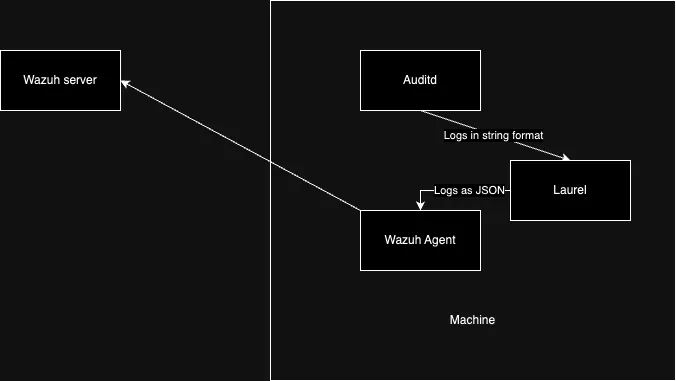
Steps Overview
-
On the VM/physical Machine:
- Installing Laurel
- Configure Laurel
- Modify wazuh config to monitor Laurel logs instead of Auditd logs
-
On the Wazuh Server:
- Implement Rules and decoder for Laurel in wazuh
Steps in Detail
1. Installation
Download the latest version of laurel from Releases · threathunters-io/laurel, there are multiple versions in accordance to the architecture of the vm/machine.
After which extract and install using the following commands:
tar xzf laurel-$FLAVOR.tar.gz laurel
sudo install -m755 laurel /usr/local/sbin/laurel
2. Setup and configure Laurel
So, following the official documentation our following steps should be:
-
Create a dedicated user
sudo useradd --system --home-dir /var/log/laurel --create-home _laurel -
Add /etc/laurel/config.toml, the file that controls laurel
- Add the following config for optimal working:
directory = "/var/log/laurel" user = "_laurel" statusreport-period = 0 input = "stdin" [auditlog] file = "audit.log" # Rotate when log file reaches this size (in bytes) size = 5000000 # When rotating, keep this number of generations around generations = 10 # [filterlog] # # If filter.filter-action is set to "log", filtered events are # # written to this log. It is configured just like [auditlog]. # file = "filtered.log" # size = 1000000 # generations = 3 # read-users = [ "splunk" ] [transform] # to convert the arguments from a string to array execve-argv = [ "array" ] # execve-argv-limit-bytes = 10000 [translate] # this section is to # arch, syscall, sockaddr structures universal = true # UID, GID values user-db = true # Drop raw (numeric) syscall, arch, UID, GID values if they are translated drop-raw = true [enrich] # Add context (event-id, comm, exe, ppid) for *pid entries pid = true # List of environment variables to log for every EXECVE event execve-env = [ "LD_PRELOAD", "LD_LIBRARY_PATH" ] # Add container context to SYSCALL-based events container = true # Add script context to SYSCALL execve events script = true # Add groups that the user (uid) is a member of. Default: true user-groups = true [label-process] # Audit records that contain certain keys can be reused as a label # attached to the process. # # This is useful in combination with audit rules such as: # -w <path> -p x -k <key> # e.g.: -w /usr/bin/dpkg -p x -k software_mgmt label-keys = [ "software_mgmt" ] # Labels can be attached to or removed from processes that run certain # programs. The file program file path (SYSCALL.exe or /proc/pid/exe) # is matched against regular expressions. This is useful for programs # that cannot be identified through auditd file watches (-w <path> -p # x -k <key>). label-exe.'^/opt/.*/bin/java$' = 'java' label-exe.'^/usr/lib/jvm/.*/bin/java$' = 'java' label-exe.'^/snap/amazon-ssm-agent/\d+/' = 'amazon-ssm-agent' unlabel-exe."bin/php$" = "java" # Labels can be attached to or removed from processes that have been identified as # scripts. label-script."^/root/maint-.*[.]sh$" = "maint" # unlabel-script."…" = "maint" # Process Labels can be propagated to spawned child processes. This is # useful for marking an entire subtree of children that have been # spawned within certain contexts (e.g. system management tools, # container runtimes, ssh servers, cron, etc.). propagate-labels = [ "software_mgmt", "amazon-ssm-agent" ] [filter] # When audit records with attached keys are being generated, # LAUREL will discard these. # filter-keys = ["filter-this"] # In addition to key based filtering it is also possible to configure label based # filtering. This alows the possibility to filter based on parent processes. # filter-labels = ["software_mgmt"] # Filter events without specified key filter-null-keys = false # Filter events that were constructed from input lines matching these # regular expressions # filter-raw-lines = [ # "^type=PATH msg=\\S*? item=\\S*? name=\"/var/run/nscd[.]sock\" " # ] # Keep the first event observed for any given process even if it would # be filtered otherwise. This should only be turned off if # reproducible process tracking or process tree reconstruction is not # required. # keep-first-per-processes = true # What to do with filtered events? "drop" or "log" to the filterlog # defined above. filter-action = "drop" -
Register LAUREL as an auditd plugin by adding the following:
active = yes direction = out type = always format = string path = /usr/local/sbin/laurel args = --config /etc/laurel/config.toml -
Restart AuditD by the following:
sudo pkill -HUP auditd
3. Configure wazuh agent to retrieve laurel logs instead of auditd logs
-
We need to add the following lines to wazuh agent’s ossec.conf (which is located in /var/ossec/etc/ossec.conf and will require sudo), will expain what it does in a min
<ossec_config> <localfile> <log_format>json</log_format> <location>/var/log/laurel/auth.json</location><!-- the location specified in /etc/laurel/config.toml as directory--> </localfile> </ossec_config> -
The addition is simple
<log_format>specifies the format of the logs present in laruel’s logfile,<location>specifies the location of the logfile to be read
-
Restart wazuh agent by running
sudo systemctl restart wazuh-agent -
Work done on agent side, on to the server.
4. Configure decoders and rules for Laurel/auditd logs
- Since Laurel Logs are proper JSON Logs, no need to write a decoder, just start with a base rule and build on top of it.
- The following is the base rule i wrote, it can be changed according to necessity
<group name="local,auditd,"> <rule id="100002" level="2"> <decoded_as>json</decoded_as> <field name="SYSCALL.SYSCALL">execve</field> <description>Auditd syscall base_rule</description> <group>audit_command,syscall,laurel,</group> </rule> ... </group> - You can build on top of this rule as per requirement, enjoy.